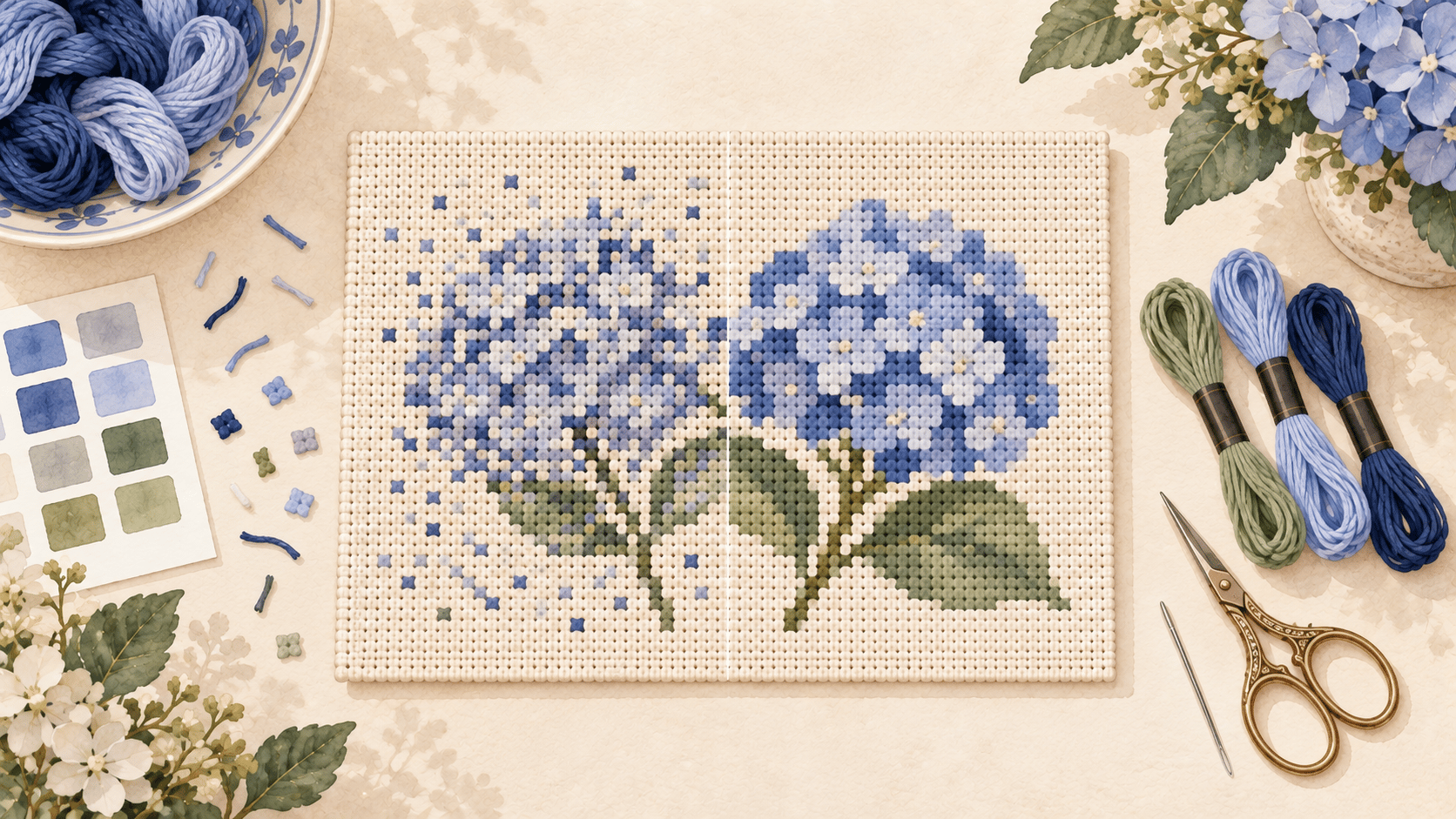
Confetti stitches are isolated colors scattered through a pattern. A few can carry important detail, like the shine in an eye. Too many turn smooth areas into visual noise, force constant thread changes, and make a generated chart much slower to stitch than it needs to be.
Do not delete every single stitch. Clean low-priority areas first, merge near-duplicate colors, strengthen useful shapes, and preserve isolated stitches only when they keep the subject recognizable.
What counts as a confetti stitch?
A confetti stitch is a cell or tiny cluster whose color appears without a useful connection to the area around it. It often sits inside a larger region of a similar color.
- One pale tan stitch inside medium tan fur
- Scattered gray stitches across a blue sky
- Several nearly identical greens alternating in grass
- Compression artifacts around the edge of a subject
- A highlight or shadow color used only once without changing the form
Not every isolated stitch is a mistake. A pupil highlight, corner of a letter, whisker point, or sharp architectural detail may depend on one cell.
Why photo converters create confetti
Photos contain sensor noise, texture, compression, reflections, and tiny lighting changes. A converter sees color differences even when a stitcher sees one continuous object.
Confetti increases when the requested palette is too large, the chart is too small for the source detail, the background is busy, the photo is compressed or noisy, similar thread colors alternate, sharpening exaggerates texture, or the crop includes low-priority scenery.
The pattern is not necessarily bad. It needs editorial cleanup after conversion.
Start by viewing the pattern at normal size
Zoomed-in grid cells can make every difference feel important. First view the chart at roughly its finished physical size. Identify the features that must survive: eyes and silhouette in a portrait, letters and borders in a monogram, windows and roofline in a house, or the boundary between subject and background.
Confetti cleanup should protect those features and simplify everything else.
Find colors used in very few stitches
The legend is a useful first filter. Look for colors used in only a handful of cells, then find where those cells appear.
- Do they form part of a recognizable feature?
- Are they in one useful area or scattered across the chart?
- Is there a nearby thread color with almost the same value?
- Does replacing them change the zoomed-out image?
A color used for five stitches in one eye may be essential. A color used for five unrelated background specks usually is not.
Merge near-duplicate thread colors
Generated palettes often include colors that look different in a list but do the same job in the stitched piece. Consider merging when they have nearly the same lightness, alternate inside one region, use hard-to-distinguish symbols, appear in tiny clusters, or produce no visible change when one replaces the other.
Keep both when they define a boundary, separate highlight from shadow, or preserve a distinctive marking. Match the chart to the thread line you will actually buy before this step, because RGB colors can map differently in DMC, Anchor, silk, wool, or another catalog.
Replace specks with the surrounding color
For an isolated stitch inside a broad region, the best replacement is usually the dominant neighboring color. Check cells above, below, left, right, and diagonally.
Do not blindly choose the most common color. Along an outline, maintain the local shape. Work in small passes: replace obvious specks, zoom out, and make sure you have not flattened an important curve or feature.
Clean backgrounds more aggressively
Background texture is one of the largest sources of confetti. Viewers usually need less information there than in the subject.
- Reduce the background to one flat color.
- Use two or three broad value bands.
- Remove small leaves, cushions, gravel, or grass texture.
- Crop closer to the subject.
- Simplify or blur the background before converting.
- Leave the background unstitched.
A quiet background also improves contrast around the silhouette.
Strengthen shapes instead of preserving noise
A scattered set of pixels may be trying to describe a curve, shadow, or fur direction. Redraw the area as a simple connected shape: turn a broken ear edge into a continuous contour, combine cheek shadows into one stepped region, replace noisy flower texture with two petal values, straighten a roofline, or reconnect a letter.
Patterns read through shapes. Connected clusters are clearer and faster to stitch than the same number of disconnected cells.
Protect useful single stitches
Keep an isolated stitch when it carries information that cannot be represented another way: an eye catchlight, pupil, nostril, letter corner, leaf point, tiny ornament, or sharpest point of an outline.
Temporarily replace the stitch and view the pattern at normal size. If the expression, letter, or object becomes less recognizable, restore it.
Reduce the palette when cleanup keeps returning
If every area contains alternating near-duplicate colors, manual cleanup may take longer than making a cleaner conversion. Reduce the palette by four to eight colors and compare.
A smaller palette often creates broader connected regions automatically. If key features remain clear at normal size, the reduced version is a better starting chart even if it is less numerically similar to the photo.
Pattern size may be the real problem
Confetti can appear when the source contains more detail than the stitch grid can hold. The converter uses single cells to hint at features that need several stitches.
Crop closer, increase chart dimensions, use finer mesh while keeping the intended physical size, or simplify small source features. More colors cannot compensate for too few cells.
Clean one area at a time
- Background
- Large interior regions
- Subject silhouette
- Major shadows and highlights
- Eyes, mouth, lettering, and focal details
- Legend review for remaining low-use colors
Save focal details for last because their isolated stitches are more likely to be intentional.
Check the chart and the stitched view
Grid scale shows broken outlines, isolated symbols, and awkward clusters. Finished scale shows whether the subject still reads and whether a color change matters.
A cleanup succeeds only when both views improve. A tidy grid that loses the expression or shape is not a better pattern.
Final confetti checklist
- Isolated background specks are removed.
- Near-duplicate colors are merged where they add no detail.
- Important outlines are continuous.
- Focal single stitches are preserved.
- No thread color remains only for meaningless noise.
- Symbols are easy to distinguish.
- The subject reads at the intended finished size.
- The palette matches the thread line you plan to use.
Clean the pattern before buying thread
Start without an account, convert at the intended stitch dimensions, and inspect the grid before buying materials. Reduce the palette, merge unnecessary colors, and keep only isolated stitches that carry real detail.
Start your patternFrequently asked questions
Are all isolated stitches bad?
No. A single stitch can preserve an eye highlight, letter corner, or sharp point. Remove it only when it adds noise rather than recognizable information.
What is the fastest way to reduce confetti?
Start with the background and colors used for very few stitches. Merge near-duplicates and replace meaningless specks with the dominant local color.
Should I reduce colors before cleaning the grid?
Usually yes. Set the pattern size first, choose a reasonable palette, then clean what remains. An oversized palette creates unnecessary manual work.
Does a larger pattern have less confetti?
It can. More cells let features form connected shapes instead of isolated hints. But a noisy photo or oversized palette can still create confetti at any size.
How many stitches should a color have before I keep it?
There is no fixed minimum. Judge its role. Five stitches that form an eye may matter; 20 scattered background specks may not.